
Plans & PricingSignup for FreeGet a demo

Trend Lines, Pivot Table, New Map Widget… ClicData 3.13!

Telmo Silvaon March 12, 2014
Last updated on July 18, 2025

Dear Users,

This week we have updated ClicData to its latest release, v3.13!

So what does the latest iteration of your favorite dashboard application has to offer?

New Pivot Table & Trend Lines

ClicData has a brand new, fully customizable, pivot table to help you sort your data! It also includes a lot of cool features such as a heat map, display of totals and subtotals, full color customization and much more!

As an add-on to your current charts, you can now add trend-line such as moving average, linear trend, histogram and many others.
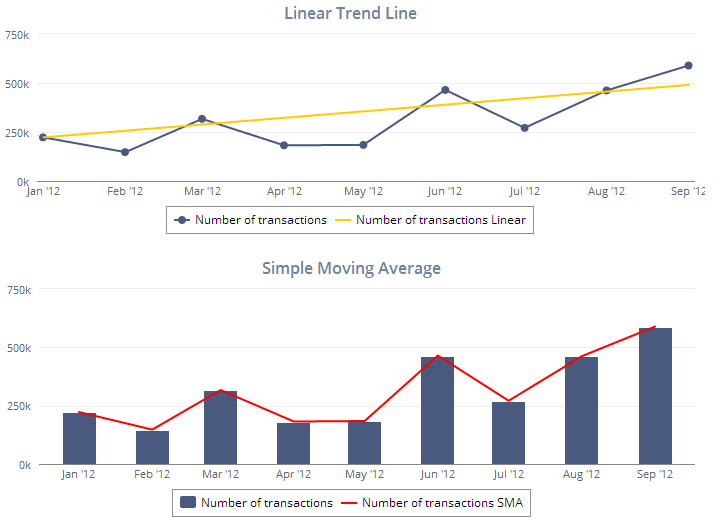
trendlines2

New Widget Maps – GPS Location

Let say you need to track multiple items on a map, in real-time or not, and you want it to be done with the ease of use of Google Maps…

Well, now you can do so in ClicData with our new map widget! A good example is worth a thousand words so just click on this dashboard below, fed with live data from the US government… and imagine you could do the same with… the position of your client deliveries for examples, pretty cool right?
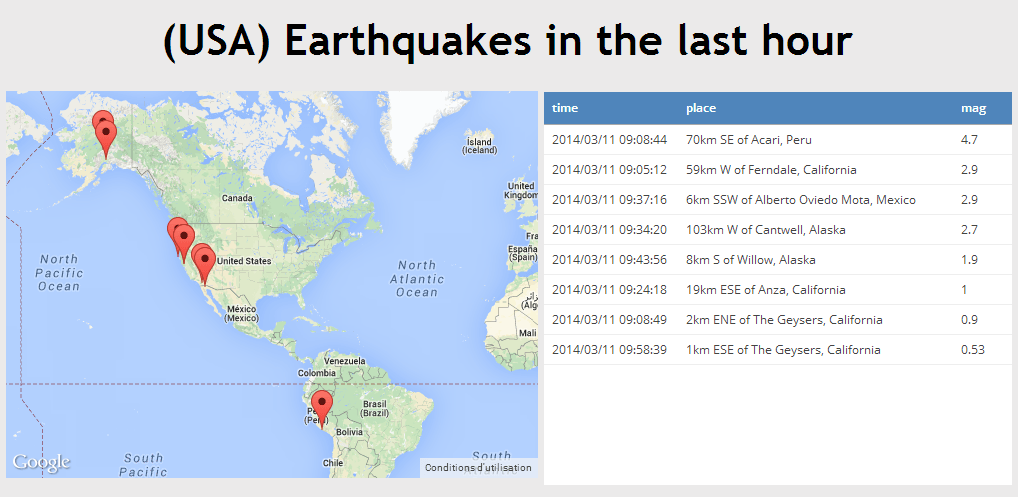
USAEarthquakes

New Connector: Smartsheet 

Smartsheet users, you can now use our brand new connector to get your data directly from Smartsheet to your ClicData dashboards! You will be able to build analytics over your smartsheet projects.

And for those who don’t know, Smartsheet is an online project management and team collaboration SaaS application which is pretty similar to spreadsheets and that includes built-in cloud-capabilities for sharing, adding attachments, integration with file storage services and Gantt charts.

Log into your ClicData account right now to try out those exciting new features!

Happy Dashboarding!

Table of Contents

Share this Blog

Other Blogs

Why AI pilots stall before the model is even the problem (BARC Report)

Most AI pilots never get cancelled. They demo well in the spring, pick up a second round of scope over the summer, and by autumn the two people who built…

AI Prompt Patterns vs. Prompt Templates: What’s The Difference and Why It Matters for BI Analysts

Prompt engineering for data analysts has one failure mode that general AI writing advice never touches: the model returns SQL that parses cleanly, runs without error, and produces a number…

AI Analytics for SaaS Platforms: How to Add Intelligence Without Building It From Scratch

Give a competent engineering team a week and they'll have something working. A GPT endpoint wired up, a charting library on the front end, a handful of SQL queries hitting…
All articles
We use cookies.
We use necessary cookies to make our site work. We'd also like to use optional cookies which help us improve our the site as well as for statistical analytic and advertising purposes. We won't set these optional cookies on your device if you do not consent to them. To learn more, please view our cookie notice.

If you decline, your information won't be tracked when you visit this website. A single cookie will be used in your browser to remember, your preference not to be tracked.
Essential Cookies
Required for website functionality such as our sales chat, forms, and navigation. 
Functional & Analytics Cookies
Helps us understand where our visitors are coming from by collecting anonymous usage data.
Advertising & Tracking Cookies
Used to deliver relevant ads and measure advertising performance across platforms like Google, Facebook, and LinkedIn.
Reject AllAccept