If your marketing team, IT department, or operations lead has started building a BI or reporting solution using Claude or another AI tool, the first few steps likely exceeded expectations. A few prompts, a working data connection, a chart that renders with real numbers. It’s genuinely impressive — and it’s easy to see why the expensive platform subscription starts to feel optional.
For a single data source, a report that doesn’t need to stay current beyond a few weeks, and a team with a developer who can maintain custom code indefinitely, building with Claude is genuinely a legitimate option. The code will work, and the early version usually runs without much attention. The friction comes later, when the scope expands, when clients start asking questions about their data, or when a compliance review surfaces gaps in infrastructure that was never built.
What’s worth understanding before going further is what’s actually happening underneath. AI agents are expanding fast — Claude now has native connectors and MCPs that extend what’s possible directly inside the tool. But for most production data workflows, the core dynamic still holds: that code needs a server to run on, credentials that stay current, a scheduler that catches failures at 3am, and someone who can fix the transform that breaks when the source changes its format upstream. None of that comes with the generated code.
This article maps where the gaps are. The goal is a balanced read — useful whether you’re mid-build, evaluating one, or just trying to cut through the noise.
At a Glance
- If your developer left next month, would anyone else know how to rotate the API credentials, restart the scheduler after a failure, or update the transform that breaks when a source changes its schema? That question is not hypothetical. It’s the maintenance gap that custom builds don’t resolve by default.
- Security in an AI-generated stack doesn’t arrive pre-configured. Encryption, SSL certificates, credential storage, data masking, audit logs: every one of those gets implemented by your team from scratch, or it simply doesn’t get implemented.
- A demo that pulls data and renders a chart is not the same thing as a production system. Production means scheduled jobs that retry on failure, access controls that work correctly for every user type, data that’s been stored continuously from day one rather than just available for the last ninety days.
- Custom builds tend to concentrate operational knowledge in whoever built them. When that person moves on, the context of how everything connects doesn’t transfer automatically.
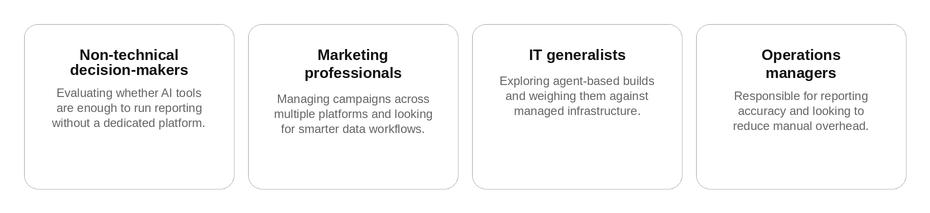
- Marketing professionals and IT generalists are the two groups most drawn to the build path, for different reasons. Early results typically look promising. What tends to shift is the set of questions that come up six months into real usage.
Who this is for:
What Claude and AI Agents Can Actually Do With Data
The table below doesn’t undersell what’s possible. Claude and other AI agents genuinely can handle all six of these tasks. However, what every entry shares is the same underlying mechanism: the agent writes code, be it a Python script, a SQL query, an HTML file, a cron job. But that code is just a starting point, not a running system.
| Task | What Claude Can Do | What You Still Own |
|---|---|---|
| Connect to Data Sources | Yes, but indirectly: Agents can write code (Python, SQL) to pull data from APIs, databases, or files (CSV/Excel). | No native connectors. You provide credentials and access. No pre-built integrations for Salesforce, Google Ads, etc. |
| Recurring Data Pulls | Yes: Agents can generate scripts (e.g., Python + cron or Airflow) to schedule pulls. | No built-in scheduler. Requires a server or external execution environment (e.g., GitHub Actions). |
| Data Cleaning | Yes: Agents can write Python (Pandas), SQL, or R scripts to clean and transform data. | No visual interface. Every transformation rule lives in code your team writes and maintains. |
| Build Dashboards | Partially: Agents can generate static dashboards (e.g., HTML/JS with Plotly, D3.js) or code for tools like Streamlit. | No interactive filtering or drill-downs without additional tooling. No user management or access controls. |
| Publish Dashboards | Yes: Agents can generate shareable HTML/JS files or deploy to GitHub Pages/Netlify. | No user authentication or permissions. Anyone with the link sees everything. |
| Alerts/Notifications | Yes: Agents can write scripts to send emails or Slack messages when data meets conditions. | No real-time monitoring. Requires external triggers such as cron jobs or webhooks. |
How Far Back Can You Actually Report?
Most source APIs don’t keep years of data accessible. Google Ads, most CRMs, most analytics platforms: the API typically surfaces a rolling window of sixty or ninety days. If the pipeline Claude built wasn’t running and archiving from the start, that window is already behind you, as no query retrieves data that was never captured.
Claude can generate the architecture for historical storage and write the code to populate it. What it can’t do is provision the database, keep it running, handle schema changes when vendors update their data structure, or verify that archiving actually ran during every period you want to report on. A managed platform handles that continuously. In a custom build, whoever holds the keys to the system holds the responsibility.
For a practical look at what reliable data pipeline architecture actually requires, the guide to building reliable data pipelines covers the decisions that matter most.
Before You Commit to Building, Ask Yourself These Questions
Before building a BI or reporting solution from scratch with Claude, it’s worth spending some time assessing the main areas the solution will need to cover. Not every area will be equally critical to your situation, but working through them before writing the first line of code tends to surface assumptions that are much harder to address once a system is already running.
The questions below are organised by area. Each section includes a short set of specific questions worth checking, followed by the context that makes them matter.
1. Data Integration and Connectors
- Which data sources will you connect to, and how many?
- Who manages credentials, and what happens when they expire or need rotating?
- What’s the plan when a source API changes or starts rate-limiting?
Every source your pipeline touches is a script Claude wrote once and your team maintains from that point forward. When Google Ads updates its API, which it does regularly, that script breaks and stops pulling data silently unless someone built monitoring for it. Who fixes it, within what timeframe, and does that answer change when the person who wrote it is unavailable? Credential management across multiple sources is a related question that’s easy to defer: OAuth tokens expire, API keys get rotated, and when someone who had access leaves the team, their credentials need to be revoked. In a custom build, that process doesn’t exist unless someone explicitly built it.
2. Data Transformation and Cleaning
- How will the transformation logic be maintained when source fields change?
- Who can modify business rules, and does that require a developer?
- What happens when bad data enters the pipeline?
Claude can write sophisticated transformation logic: deduplication, type conversion, multi-source joins, null handling. The harder question is what happens six months later when a source changes a field name, or a client asks to adjust the revenue calculation. Every change means finding the right script, editing it, testing it, and redeploying. There’s no interface for a non-technical account manager to make that change themselves. Bad data is the related risk: duplicate records and null values in key fields don’t throw errors in a custom pipeline. They arrive in the dashboard and get noticed, if they get noticed at all, by whoever is reviewing the numbers before a client call.
3. Storage and Historical Data
- Where will historical data be stored, and who owns that infrastructure?
- Was the pipeline designed to archive continuously from day one?
- Does the reporting need time-series data, such as daily or weekly snapshots?
Claude can write the SQL to create a historical database and the scripts to populate it, but the database needs to be provisioned and maintained by your team. Most source APIs only expose a rolling window of sixty to ninety days, so if the archiving wasn’t running from the start, that history is already gone and cannot be reconstructed. Time-series reporting is the follow-on question: daily campaign snapshots, weekly performance summaries, month-over-month comparisons all require data that was captured and stored over time. A pipeline that only pulls the current state of data cannot answer those questions retroactively.
4. Scheduling and Automation
- Is the scheduler running in a production environment, or does someone trigger jobs manually?
- What happens when a scheduled job fails silently?
- How are job dependencies managed when one process needs to complete before another starts?
Claude can generate a cron job or an Airflow DAG, but the environment those jobs run in needs to exist outside the AI conversation. Data can stop refreshing without any visible error, and the first sign is often a client asking why this week’s numbers look identical to last week’s. Failure handling needs to be explicitly built: does the pipeline retry automatically, and does anyone get notified when it doesn’t? Dependency management is the subtler problem, where Job B runs on data that Job A hasn’t finished producing yet, and the results are wrong in ways that are hard to trace without knowing the architecture.
5. Dashboards and Visualization
- Will dashboards be static or interactive, with filtering and drill-downs?
- How are user permissions managed, and can each client see only their own data?
- How do dashboards stay current, and what triggers a refresh?
The gap between a dashboard Claude generated and one that’s ready for a client is often larger than it looks. Static charts with no date filtering, apps where every user sees the same data, and shared links with no access control work fine as internal prototypes. Client-facing reporting typically requires users to filter by their own campaigns, see only their own numbers, and access the dashboard through something more controlled than a URL. As the client base grows, adding a new client to a custom access layer means touching code every time rather than adding a user to a platform. The dashboard lifecycle guide covers what a production-ready deployment actually involves at each stage.
6. Alerts and Notifications
- Can clients configure their own alert thresholds, or does every change go through a developer?
- Does monitoring run in real time, or on a scheduled check that may be hours behind?
- What channels need to be supported, and is that likely to change?
Claude can write an alert script that monitors a condition and sends a Slack message, and that covers the basic case well. The questions that surface later are about self-service: whether clients can set their own thresholds without asking a developer, and whether the system detects changes as they happen or on a delay. Channel coverage is worth thinking through early too. Email, Teams, and SMS each require separate integrations. Adding a new channel after the system is live isn’t a setting to toggle; it’s a development task that competes with everything else on the backlog.
7. Security and Compliance
- Is encryption configured at rest, in transit, and at the application layer?
- Does an audit log exist that can show who accessed what data and when?
- Which compliance requirements apply to your clients, and which are currently addressed?
None of the security infrastructure in a Claude-built system is configured by default. Encryption, SSL certificates, role-based access, and audit logging each need to be implemented explicitly, and retrofitting them onto a running system is significantly harder than building them in from the start. For agencies handling client data under GDPR or similar requirements, the audit question deserves specific attention: if a client or regulator asks who accessed their data and when, that log either exists or it doesn’t.
8. Scalability and Performance
- Has the architecture been designed for the expected number of sources and concurrent users, not just the initial use case?
- How is client data isolated in a multi-tenant setup?
- What’s the recovery plan when the system goes down?
A well-built custom pipeline handling a few sources and a handful of users can run cleanly. The architecture that works at that scale is often not the architecture that handles twenty sources and fifty concurrent users. Query performance, concurrent dashboard access, and data isolation between clients each require deliberate design decisions that are easy to skip when the first version is small. For agencies in particular, the multi-tenant question matters: in a single custom system, separating one client’s data from another’s requires explicit schema logic, and without it, a query error can expose data across client boundaries.
9. Cost and Maintenance
- What are the full ongoing costs, beyond the initial build?
- Who is specifically responsible for maintenance, and what does that look like week to week?
- What’s the plan if the person who built and understands the system isn’t available?
The build cost is the number that tends to appear in comparisons against a platform subscription. The costs that don’t appear in those comparisons are the ongoing ones: developer hours each month to keep the system running, time spent on dependency updates and API changes, and the effort required to rebuild operational knowledge when the person who understands it moves on. A data stack whose logic lives in one person’s head is a business risk regardless of how well it was built. The question worth putting in writing before starting: who owns maintenance, what that role covers week to week, and what the contingency is if that person isn’t available.
What Happens to the AI-Built Solution Over Time?
The first few months of a custom data stack usually go well. The person who built it knows every part of it, patches come fast, and the whole thing feels solid. Then something routine breaks it: an API changes its auth flow, a library releases a breaking update, a source starts formatting a date field differently. Each of those needs someone who knows exactly where to look.
Claude-assisted builds can go live quickly, but they often get documented slowly. The developer who assembled the system keeps the real mental map: which job runs first, where credentials are stored, what the fallback logic does, and which parts are fragile. When that person is out, overloaded, or leaves, the map does not automatically transfer. The code may still work, but modifying it safely becomes much harder without the context that shaped it.
And then scale adds another layer. Three data sources running cleanly for five users is a tractable problem. Getting to twenty sources and fifty users means rethinking job isolation, access controls, credential scoping, and failure handling, each of which was fine as a one-off but wasn’t designed for that volume. That rework tends to land when the business is growing and there’s no slack in the schedule to absorb it.
Build vs. Buy Has Always Been the Real Question
AI lowered the cost of starting a build, which means that more teams can test data ideas that used to require headcount they didn’t have, and that’s a good thing. However, owning a production data system means being responsible for its uptime, its security posture, its compliance readiness, its credentials, its dependency upgrades, and its access controls as users come and go.
None of that transfers to the tool that wrote the initial code.
The teams that move to managed platforms are not usually the ones that failed to build something; they are the ones who realized operating a custom data system, every day, for real users who depend on it, is a different job from assembling one. And often, it is a job competing with the work they actually need to do.
ClicData brings those responsibilities under one platform: 200+ native connectors, a built-in data warehouse, automated pipeline scheduling, multi-tenant dashboards with embedded analytics, white-labeling, and role-based access control. What that looks like for teams managing client accounts at scale is on the marketing agency solution page.
To map your current setup against these questions with someone who knows the platform, booking a session with the team is a straightforward starting point.