The first use of the term “multitasking” occurred in 1965 by IBM when they described the capabilities of the IBM System/360. (While it may have also been the beginning of Skynet, I’ll save that discussion for another blog at another time.)
Probably everyone you know—and many more that you don’t know—have at one time or another described themselves in an interview as being an “excellent multitasker.” But the truth is, they aren’t. What people are actually doing when they think they’re multitasking is engaging in something called “cognitive shifting.” After decades of assuming that humans can, like computers, perform multiple tasks at once, it turns out that the brain is not capable of performing two functions at the same time. As extraordinarily complex and surprising as the human brain might be, it cannot work on more than one task at any given moment.
Further, many studies have proven that human attempts to multitask are far less efficient at accomplishing the desired set of tasks than simply focusing on and doing one single, uninterrupted task.
Don’t believe me?
How easy have you found it to watch T.V. and create a spreadsheet, efficiently—and without any errors? What about texting and driving? Or texting and walking, for that matter? Ever notice that when someone is attempting to engage with their smartphone, they either slow down or stop altogether? A study by René Marois, a psychologist at Vanderbilt University, discovered that multitasking is slower due to what he calls “paralysis by analysis.” It seems that each time the brain has to stop one task and switch to another task, it begins to build up a “response selection bottleneck.” When the brain is asked to work on more than one task simultaneously, it must first choose which activity is most important, an activity in itself which takes more time away from the task(s) at hand.
Psychologist David Meyer of the University of Michigan describes something similar. When the brain is deciding what to focus on, it goes through a process of prioritizing, and so it experiences “adaptive executive control,” a self-imposed effort to place a priority on each activity. More time-consuming work that slows the overall process.
Now, it is theoretically possible for someone to train themselves to perform a prescribed set of tasks simultaneously and fairly efficiency. For example, the swing of a professional golfer takes approximately 1.3 seconds from backswing to impact with the ball. During that time, the golfer must complete a long list of tasks that could fill an entire paper by itself. (I found one site that listed 31 tasks.) Tasks on that list include keeping the arm straight, shifting the weight back (but not too much), keeping the head down, moving the hips forward and ahead of the swing, all as they keep their feet planted to the tee box grass. If you think about it, each aspect of a golfer’s swing can be coached, corrected, and improved upon. So, isn’t a 1.3-second golf swing just a well-executed set of memorized tasks?
Perhaps. But practically speaking, it is not a useful approach for our daily business activities.
When it comes to day-to-day activities and operations, we can’t get away from the fact that we’ll never be able to repeat a single day over and over in order to memorize and perfect all the tasks that are being called for. So we can never optimize our performance of the more mundane chores and duties of business life.
Yet business leaders, department managers, and executives often have this mistaken perception, and even apply it as they attempt to review their Key Performance Indicators (KPIs) to help them measure the effectiveness and performance of their department or business. Many still use spreadsheets to review their KPIs, and so they experience the very same “response selection bottleneck” that Marois points to in his discussion of multitasking—reducing their effectiveness and wasting time. Some, intending review KPIs in order to review their company’s standings, might run ten different reports on ten different KPIs. Reviewing them on spreadsheets inevitably leads to “paralysis by analysis” and wastes vast amounts of time. While some leaders might be reasonably good at switching between tasks, no one can honestly say that their time spent flipping through daily reports and spreadsheets is actually efficient.
On the other hand, business leaders who use business intelligence and data visualization to deliver their KPIs to monitor their company performance won’t run into that bottleneck and won’t be hampered by their own brain’s attempts to prioritize the data. They can also easily repeat those reports at a moment’s notice, whenever they need or want to.

Executive KPI dashboards can give business leaders a view of their business metrics in approximately 1.3 seconds, along with the ability to drill down to see the tasks that are behind each individual KPI. They don’t need to tax their brains to multitask; they don’t waste their valuable time forcing their brain to figure what’s the next task to tackle.
Business leaders and managers can also set dynamic dashboards to apply a set of rules to their KPIs that indicate which KPIs need to be prioritized over those that don’t warrant attention at the moment. Like a green/yellow/red light indicator assigned to each KPI, adapting to preset rules that they choose.
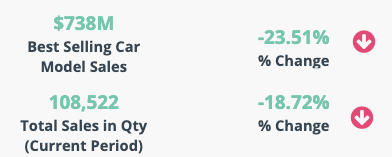
No need for the human brain to multitask on that level. Executive KPI dashboards do the work and reduce distractions, recoup lost time, and help avoid paralysis by analysis.
If you could be informed of the status of your leading KPIs before you could finish your morning cup of coffee, would it help you manage differently?
Would it help you manage better? Give your brain a break.
Better manage your team and business with dashboards
Track your day-to-day indicators on interactive and real-time dashboards with your team on ClicData. Connect your data from any source, set up your data refresh schedules once and forget about it. And it’s free to try!