ClicData provides the ability to extract, transform and load your data into the platform so that you can prepare the calculations for your dashboards.
Not a lot of technical knowledge is required since we provide visual capabilities of data manipulation.
However, there are a couple of advanced features and concepts that need to be mastered by the Editors or Admins. One of them is the Cache functionality.
The cache feature is useful if you have a complex data transformation (ETL) process on the Data section on ClicData. The cache can be applied only to views, merges, fusions and not on top of data sources. Look at the below example:
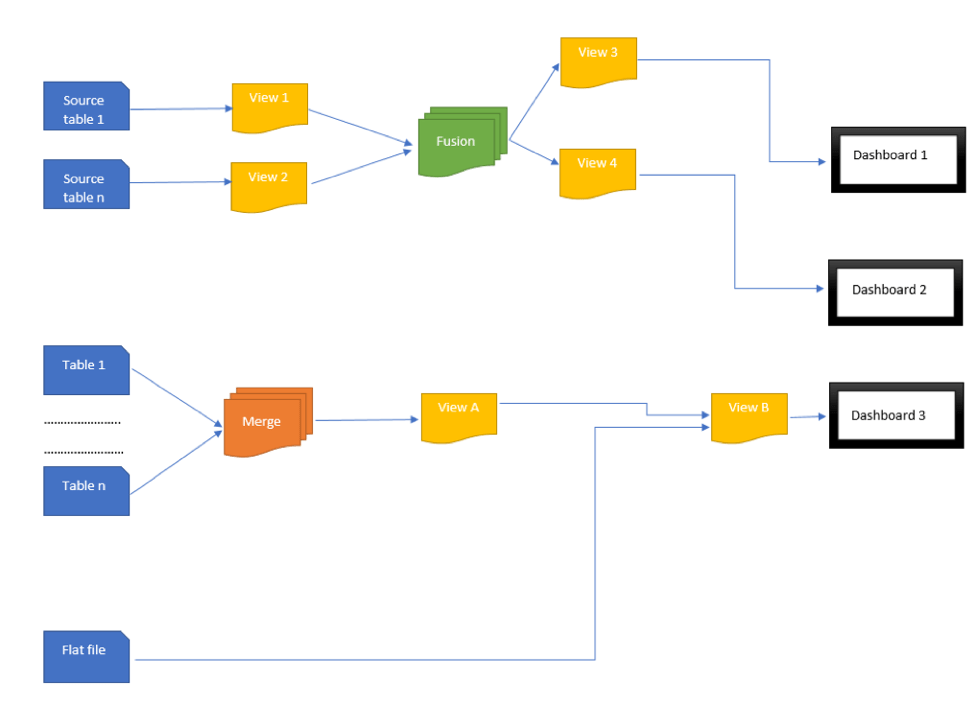
How your data looks like – Scenario
In this case scenario, the user imported a couple of data sources from different systems: from a database (Source 1 …Source n), from a CRM system (Table 1…Table n) and a flat-file (containing Budget information). He builds data transformations on Views (cleanse of data and builds other calculated columns) and then includes the Views in a Fusion. The tables imported from the CRM system are merged in order to combine information from different tables into one data set. On top of the Fusion and Merges there are additional Views built which are preparing the data for different dashboards. Additional calculated columns are added at this step.
What happens on dashboards with no cache?
Once you load a dashboard on editor mode or via the Live Link, each widget goes back to the data and requests the updated data rows. ClicData goes to each view, merge, fusion and processed the data transformations applied. In case you have complex calculation not only on the data side but also on the dashboard, the results might take longer to display.
What happens on dashboards when the data is cached?
To improve the performance of our end-users, our hard-working engineering team implemented the cache functionality. Basically, if you cache a data set, the data becomes static.
Let’s go back to our example. ClicData refreshes the data sources based on a schedule. This means that each merge, fusion, view is evaluated and updated automatically. When the cache is enabled, after the data sets are updated, the data is “stored” on our database. When the widget “calls” the data, the calculations are not processed each time, but we retrieve the result directly from the static tables.
How to cache your tables?
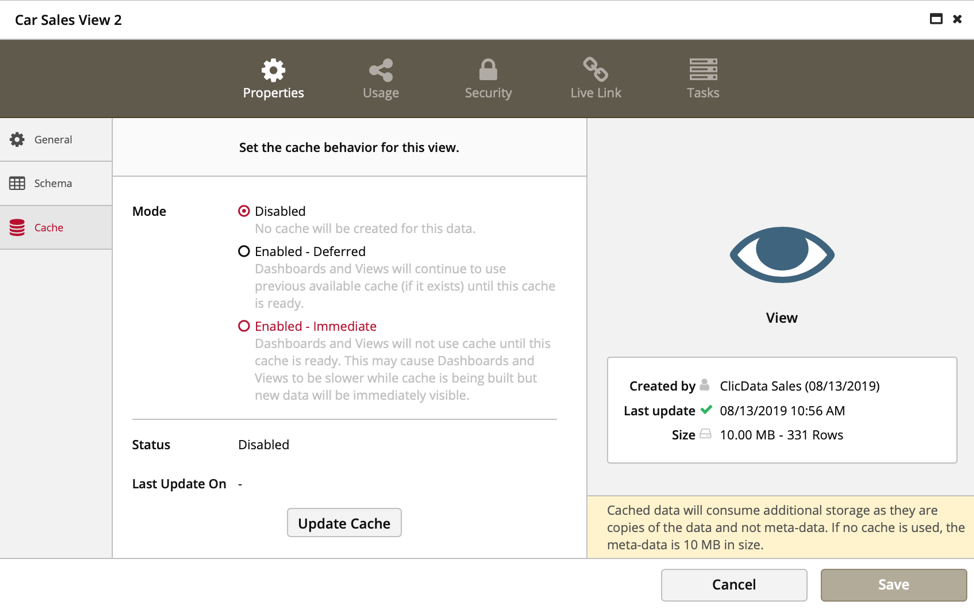
To enable the Cache, you need to access the data set properties. In this screen, you can find the cache drop-down list.
You can set up to cache the data by giving priority to fresh data (Immediate) or to the performance of your dashboards (Deferred).
The difference between the 2 methods lies in the duration that takes for the dashboard to reference the new data imported.
If you choose “Enabled – Immediate”, when the data sets are refreshed, the dashboards will refer the new data immediately. After that, the cache is built and the dashboards will switch back to refer the cache data sets.
If you choose “Enabled – Deferred”, the dashboards will refer the new data sets after the cache has been built.
However, you should not cache all the data sets on your account. Going back to the above example, the cache should be enabled only for View 3, View 4 and View B. There is no reason to cache merge since the data is not “called” directly from the dashboard.
You might be interested in this topic: Data Model Optimization For Better Performance