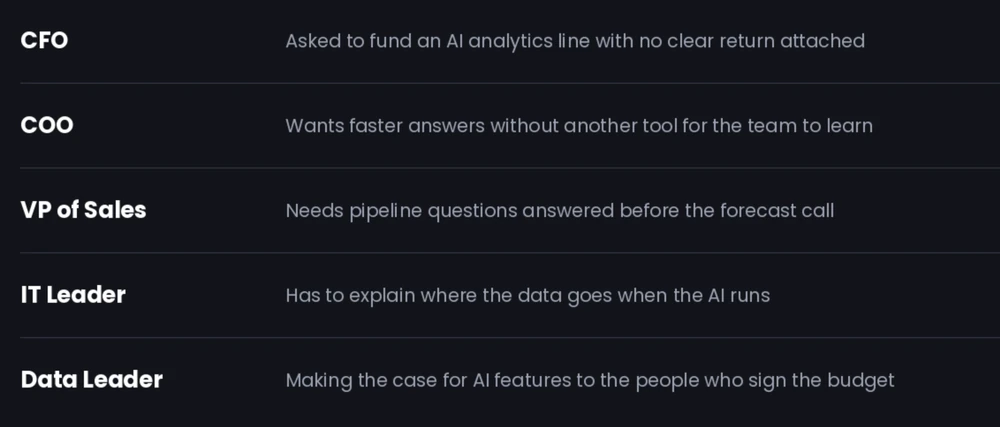
Your data lead has asked for budget for “AI analytics,” and while you’ve heard the term in every vendor meeting this year, you couldn’t tell the board what it would buy or what it should return. Every platform pitches some version of it, and very few are clear about cost, effort, or results. This guide is for business leaders at mid-market companies, large enough that analyst time is a real constraint but without a data science team on standby. It covers what AI analytics ROI actually depends on: which capabilities move the needle, which ones mostly decorate a demo, and how to decide whether funding makes sense right now. The short version fits in a budget meeting: if you can’t name the bottleneck, you can’t measure the return.
At a Glance
- AI analytics is a layer of capabilities on top of the dashboards you already run, and most mid-market companies get their return from two or three of them, chosen by where analyst hours actually go.
- Track a week of your team’s time before any vendor meeting, because without that baseline every ROI figure in the proposal is a guess.
- Two reasons to wait: data that isn’t documented or governed, the gap behind Gartner’s 2025 prediction that 60% of AI projects lacking AI-ready data would be abandoned through 2026, and dashboards people already ignore, since adding AI won’t change that habit.
- What changes is how analysts spend their week rather than how many you need; ClicData builds its AI into the dashboards and data flows teams already use and is plain about the parts that still need a person.
Who This Is For
What “AI Analytics” Actually Means in Business Terms
Ask three vendors to define AI analytics and you’ll get three answers, each shaped around their own product. A more useful definition is functional: whatever lets your people get a reliable answer from data with less waiting and less manual work.
A Layer on Top of the BI You Already Run
AI analytics adds capabilities to the dashboards and reports you already have rather than replacing them. Your team keeps the views and refresh schedules it trusts and gains new ways of using them, like typing a question into a dashboard instead of filing a ticket with the analyst. If a proposal requires rebuilding your reporting before any AI shows up, that’s a platform migration with an AI label, and it should be costed and evaluated as one.
It Speeds Up Three Kinds of Work
Strip away the branding and nearly every feature accelerates one of these:
- Answering ad hoc questions. A sales lead asks the dashboard directly instead of waiting two days for an analyst to write the query.
- Spotting problems early, so a drop in conversion surfaces before the weekly review rather than during it.
- Building routine reports, the monthly packs that eat analyst time without needing much analytical judgment.
Between them, these three account for most of the AI business intelligence value a mid-market company will see.
Judgment Still Belongs to Your Team
AI drafts answers and surfaces patterns faster than a person can, but it doesn’t know that last quarter’s dip came from a pricing change, or that a regional manager quietly reclassified two accounts in March. Context, priorities, and the decision itself stay with your people; what changes is that they spend more of the week on questions that need judgment and less on the ones that don’t. We covered what that shift looks like day to day in our guide to moving from BI to AI analytics.
If your team spends a lot of time on repeat questions, repeat reports, or problems found too late, AI analytics has something to work on; if your analysts are already lean and mostly strategic, expect a smaller return.
Which AI Capabilities Actually Drive ROI
Most pitches go vague here, so judge every business intelligence AI feature by the bottleneck it removes and a question about your own team.
Natural Language Questions: Faster Answers Without the Analyst Queue
A business user types “which regions missed their margin target last month?” and gets a chart back without anyone writing SQL. The return comes from shortening analysts queue and reducing the interruptions the analysts faces daily. How many one-off data questions does your team field each week, and how long does each take? When that number is high, this usually pays back first.
Automated Alerts: Problems Caught Hours or Days Earlier
Alerts notify someone when a metric crosses a threshold. Well-defined conditions are the foundation, and AI adds value on top of them rather than replacing them, as our guide to automated dashboard alerts explains. How does your team find problems today? If the honest answer is “someone happened to open the right dashboard,” alerts close a real gap.
Predictive Forecasting: Better Visibility Into Next Quarter
How often did last year’s quarterly forecasts miss, and what did the misses cost in overstock, hiring, or credibility with the board? If the answer stings, better models can earn their keep; if forecasts already land within a tolerable range, the gain is smaller than the vendor will suggest, and forecasting depends more than any other capability on clean, consistent history.
Automated Report Templates: Routine Reports Built Faster
Some platforms now build a draft dashboard from a plain-English description and summarize what each chart shows. Ask what share of analyst time goes into building and updating the same reports each month, because if it’s large, freeing even part of it is a return you can count in hours.
Smart Data Prep: Fewer Hours Wrangling Messy Data
Someone usually has to make the sources agree before analysis starts, matching customer IDs and writing the formula that turns raw orders into net revenue, and AI assistance can suggest joins and write that logic from a description. How many hours a week go into that reconciliation? If it’s a recurring frustration, this shortens it, though it won’t settle which definition of revenue is correct.
You don’t need all five. Most mid-market companies get a real return from two or three, and the right ones are whichever address the place your team’s time actually goes.
How to Assess ROI Before You Buy
Work through this checklist before the first vendor meeting; the answers decide which demos are worth your time.
- Map where your team’s time actually goes. Ask analysts to log, for one week, roughly where their hours land: ad hoc requests, recurring reports, data cleanup, actual analysis. If you can’t describe the block that eats 40% of the week, no vendor can either, and their ROI estimate will rest on their assumptions.
- Define what success looks like in metrics. “Faster insights” won’t survive a budget review; “cut the average turnaround on ad hoc questions from four hours to under one” will, because it has a baseline, a target, and a way to check. Agree on two or three metrics like this before you sign; that’s also how to measure AI analytics ROI after launch. For a broader method of putting a financial value on analytics improvements, our analytics ROI framework walks through the calculation.
- Test the capability on your own data. Demos of AI analytics tools run on clean, chosen datasets. Ask for a two-week pilot on one use case using your real sources, and don’t let the vendor pick a tidy subset. If natural language questions return wrong answers on your actual data, you’ve learned that for the price of two weeks rather than an annual contract.
- Measure adoption, not just features. A capability nobody uses returns nothing. Ask vendors what share of their customers’ users touch a given feature each week, and how that changes after the first month. A vendor who can show AI analytics adoption data from companies like yours is offering evidence; one who can only list analytics platform AI features is offering a brochure.
- Price the total cost of ownership. The license is the visible part; implementation, data cleanup, training, and ongoing tuning sit underneath it. Gartner’s 2026 analysis of the AI value gap found that only one in five organizations realizes high ROI from its AI initiatives, and that the most satisfied invest four times more in data, governance, and people than the least satisfied (Gartner, 2026). So ask every vendor what customers like you typically spend on implementation, training, and support to reach a productive state, and treat a vague answer as a large one.
When AI Analytics Is Worth Funding and When It Is Not
Is AI analytics worth it? In some situations clearly yes, in others not yet, and the difference is usually visible before you spend anything.
It’s likely worth funding when:
- Your analysts spend more than about 30% of their time answering repeat ad hoc questions.
- Problems in your numbers get caught because someone happens to check a dashboard, rather than because anything flagged them.
- The business is growing faster than analyst headcount, and you need more output per person.
- Your data is already documented and governed, so the AI has reliable inputs.
It’s probably not worth funding yet when:
- Your data is undocumented, inconsistent, or scattered across systems that disagree.
- Dashboard adoption is already low, since adding AI to tools people ignore won’t change the habit.
- Your analysts have spare capacity and aren’t the bottleneck.
- Your company hasn’t yet run a successful analytics initiative, which makes this a hard first project.
Give data readiness the most weight. In BARC’s 2026 research, only 23% of organizations qualified as AI Leaders, with executive-led, governed, production-deployed AI, a share that has barely moved in three years, and the bottleneck was data rather than models, as we covered in why AI pilots stall before the model is even the problem. In a Gartner survey, 63% of data management leaders said their organizations either lack the right data management practices for AI or aren’t sure, and Gartner predicted that through 2026 organizations would abandon 60% of AI projects unsupported by AI-ready data (Gartner, 2025). When the foundation is shaky, building a solid data foundation comes first, and it’s cheaper than a failed pilot.
What Can Go Wrong and How to Avoid It
Does AI analytics really work? It can, but the investments that disappoint tend to fail in the same five ways, and each can be headed off early.
- Low Adoption Because the Workflow Does Not Fit: People have to leave the dashboards they know and open a separate AI interface, so after launch week most of them stop, and a feature nobody opens returns nothing however capable it is. Favor AI that runs inside the tools your team already uses.
- Expectations That Outrun What the AI Delivers: Someone tells the board AI analytics will halve the analyst team, and a year later the team has reclaimed real hours but is the same size, so the project gets labeled a failure despite delivering. Set expectations in the metrics from the previous section and judge the result against those.
- Models That Drift as Your Business Changes: A forecasting model trained on last year’s product mix doesn’t know you dropped a category in March. Ask vendors who notices when the business shifts and what retraining involves; well-maintained data pipelines help too, because changed inputs show up before they corrupt the outputs.
- Security and Compliance Questions That Surface Too Late: You learn after deployment that the AI layer sends records to an outside provider your contracts don’t allow. Before signing, ask where models run, what exactly is transmitted per question, and whether your data is ever used for training.
- Cost Overruns From Support and Tuning Nobody Budgeted: The license fits the budget; the consultant hours, usage-based charges, and time spent correcting answers don’t. Ask reference customers for their total spend, since they’ll describe it more candidly than any sales team.
How ClicData Approaches AI Analytics
Everything above comes back to three conditions: the AI sits where people already work, runs on data in decent shape, and maps to a specific bottleneck. That’s the standard we hold ClicData’s AI features to. If your dashboards already live in ClicData, these features are a layer on top of them, with nothing to migrate or retrain. If they live elsewhere, the same advice we give for any platform applies: cost the move before you count the AI.
For the ad hoc question queue, the Ask AI widget sits directly on a dashboard. Your data team connects the datasets, writes a short instruction defining what users can ask, and publishes, so a sales lead can ask which deals look at risk without opening a ticket; the widget only queries the datasets it’s been given, under your existing permissions. Analysts get the same in data tables, and narrative analytics explains charts for executives.
For routine reporting, the AI Dashboard Builder takes a data table and a description of what you want to track, then refines by chat. It’s a first release, and early user Michael Muse, CEO of Muse and Gordon Consulting, noted that it turns a prompt into a full dashboard quickly while still needing minor tweaks. For data prep, the Data Flow module writes formulas from a plain-English description for you to review.
On what leaves your environment, ClicData generates the query on its side, and only the question and query structure go to the language model provider; raw data isn’t transmitted or used for training, as ClicData’s AI page details.
The limitations matter too. ClicData’s standard alerts are conditions you define, delivered by email, SMS, Slack, or web service; AI Agents that monitor KPIs and flag movement outside an expected range are listed on the AI page and may need a higher-tier plan. Forecasting runs through Data Scripts, a Python and SQL environment that needs someone who understands code and is available on Dedicated plans. ClicData’s AI assistant and agent features draw on a monthly allowance of AI credits, from 5,000 on Basic to 30,000 on Enterprise, with more available to buy, so check the pricing page against your expected usage.
To test this against your own data rather than a demo set and start a free trial.
Conclusion: Know the ROI Before You Fund It
AI analytics isn’t a category you adopt or ignore wholesale. It’s a set of capabilities that each solve a specific bottleneck, and knowing when to buy AI analytics comes down to whether you’ve named that bottleneck, agreed what success looks like, and found a tool that fits how your team already works.
Before your next vendor meeting, answer three questions:
- What does your team spend the most time on that’s repetitive?
- What metric would prove the investment worked?
- What data quality issues would need fixing first?
If you can’t answer them yet, you’re not ready to buy, and the week spent finding out will save more than any vendor discount. If you can, book a session and test ClicData against those answers.
FAQs
What Is AI Analytics, and How Is It Different From Regular Business Intelligence?
Regular business intelligence shows you what happened, once someone has built the query and the dashboard. AI analytics adds capabilities on top: answering plain-English questions, flagging changes as they happen, projecting trends forward, and drafting reports. The underlying data, metrics, and dashboards stay the same; what changes is how quickly people get from a question to an answer.
How Much Money Can AI Analytics Save My Company?
It depends on where your team’s time goes today, so any figure quoted before you’ve measured that is a guess. Start from hours spent each week on repeat questions, routine reports, and data cleanup. Multiply the share a capability can realistically remove by the loaded hourly cost, then subtract license, implementation, and support. That gives you an honest AI analytics cost benefit estimate.
How Long Does It Take to Implement AI Analytics and See ROI?
If your data is well organized and the AI runs inside tools your team already uses, a two-week pilot shows whether a capability works on your data, and a quarter is a reasonable window to judge the return. If data needs cleaning or reporting has to move to a new platform first, budget for that separately, because it usually takes longer than the AI setup.
Will AI Analytics Replace My Data Analysts?
It changes what analysts do more than how many you need. Repeat questions and routine report building shrink, freeing time for analysis that needs judgment. Some companies keep headcount and redeploy that time to strategic work; others let the team grow more slowly as the business expands. Which path you take is a strategy decision, and the technology doesn’t make it for you.
What Happens to AI Models When My Business or Data Changes?
Models trained on historical patterns can drift when your product mix, pricing, or customer base shifts. Ask vendors who monitors accuracy, how drift is detected, and what retraining involves. Features that query live data, such as plain-English questions, are less exposed than forecasting models, but they still depend on your metric definitions staying current.
Do I Need to Clean Up My Data Before Implementing AI Analytics?
Yes, at least the data the AI will touch first. AI analytics works on the same inputs as your dashboards, so inconsistent definitions or duplicate records produce confident wrong answers, only faster. You don’t need to fix everything at once; start with the sources behind the one or two use cases you plan to pilot.
How Do I Know if My Team Is Ready for AI Analytics?
Three signs point to readiness: you can describe where analyst time goes, your core data is documented and trusted, and people already use the dashboards you have. If any of those is missing, address it first, because AI tends to amplify existing habits rather than create new ones.
What Is the Total Cost of Ownership for AI Analytics, Beyond the Software License?
Budget for implementation and configuration, data cleanup, user training, usage-based charges where pricing depends on query volume, and ongoing tuning as the business changes. If features draw on usage credits or tokens, ask how they’re metered and what a typical month costs a company your size. Reference customers are the best source for realistic totals.